UV Tan: Tanning & Sun Tracker
- 4.2
- Rating
- 50.00K
- Installs
- Free
- Price

 Analysis by App-foxy
I usually reach for a weather app to decide whether I need a jacket, but UV Tan: Tanning & Sun Tracker approaches the forecast from a more specific angle: how much sun exposure is sensible today. After spending time with it, I see it as a focused weather app for people who plan outdoor time around sunlight rather than temperature alone. Its combination of UV information, tanning timers, burn-awareness tools, and AI-assisted guidance makes it more practical for beach days, gardening, walks, and outdoor sport than a standard forecast screen.
The app is free to start, is made by Emmett Deen, and is rated for Everyone. It has reached over fifty thousand installs and holds a 4.2 average from around one hundred ratings, which suggests a small but reasonably positive user base. That context matters: this is not trying to replace a full weather service with radar, storm maps, and detailed forecasts. It is a narrower tool built around sun exposure, and its value depends on whether that is the information you actually want.
How UV Tan fits into a real day outdoors
The most useful way to think about this app is as a planning companion rather than a complete medical or meteorological authority. Before going outside, I can use it to consider the day’s UV conditions, think about how long I intend to remain in the sun, and set a more deliberate limit instead of relying on the vague feeling that the weather “doesn’t look too strong.” That is especially helpful on bright, breezy days when the air feels comfortable but exposure can still build quickly.
You May Also Like

 Pandora - Music & Podcasts
Pandora’s Music Is Easy to Start, but Harder to Recover
Pandora’s strength is its low-effort path from a seed to a station. Its weak spot is how much confidence it asks you to place in connection, setup, and quiet recovery.

 8 Ball Pool
 Is Built on Rivalries, Rematches, and Routine
A close look at the rivalries, rematches, shared routines, and unanswered safety questions that turn a quick pool match into a persistent mobile community.

 Samsung Music
’s Quiet Strength Is Playing What You Already Own
Its reach comes less from spectacle than from dependable access to a personal library. That simplicity is both the app’s strongest retention engine and its ceiling.

 AccuWeather: Weather Radar
AccuWeather Review: A Quick, Clear Forecast for Everyday Decisions
For everyday plans, the best forecast is the one you can understand quickly. AccuWeather makes rain timing, radar, and local conditions easy to act on, with a few trade-offs.

 Hill Climb Racing
Why Hill Climb Racing Still Turns Crashes Into One More Run
A tiny car, a bumpy hill and one more upgrade: Hill Climb Racing keeps resurfacing because its simple chaos makes every near-miss feel personal.

 AliExpress - Shopping App
AliExpress Makes Global Shopping Feel Personal, but Shoppers Bear the Risk
AliExpress turns a global marketplace into a pocket-sized discovery engine. Its reach is useful, its shopping loop compelling, and its trade-offs easy to miss.
More From Our News Desk
View All News


A realistic example would be a Saturday afternoon at the park. I might check the usual weather app for rain and temperature, then open UV Tan to focus on sunlight. If I am planning to sit outside, I can use the burn-timing part of the experience as a reminder to move into shade, reapply protection, or end the session. The important change is behavioral: the app encourages me to make a plan before my skin starts feeling uncomfortable.
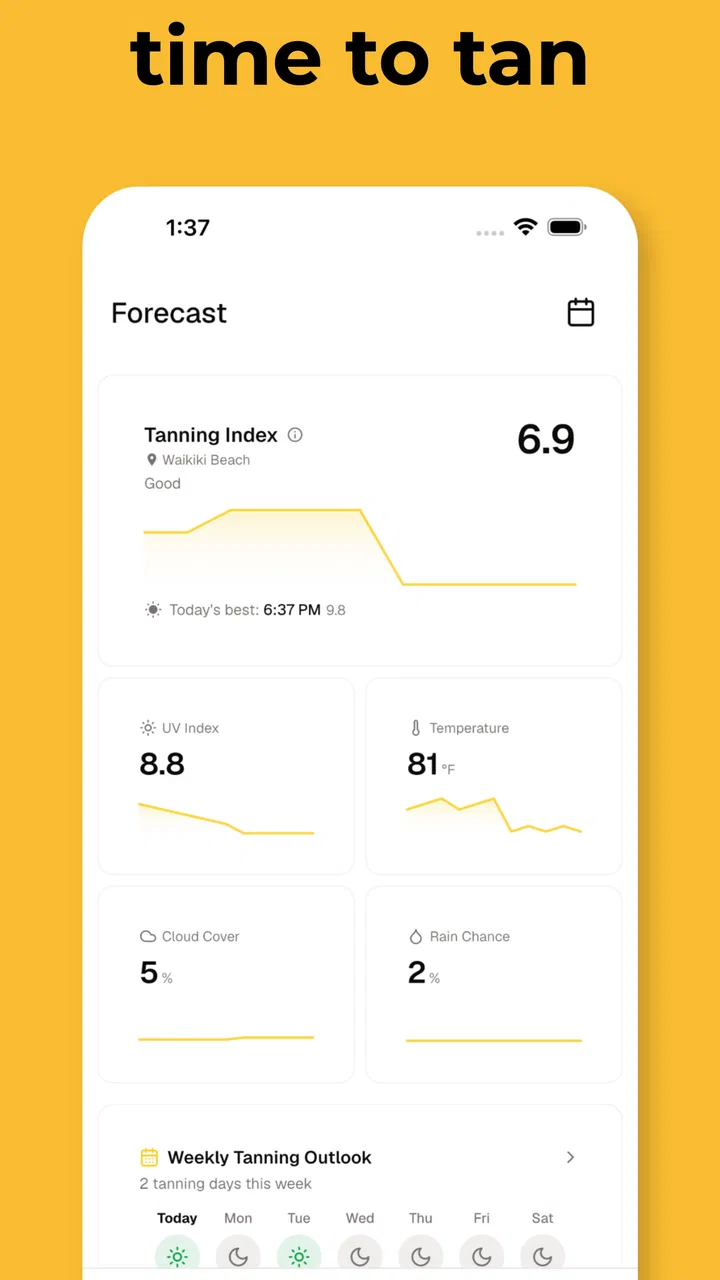
That makes it different from ordinary weather apps. Most general-purpose services give the UV Index one small place among temperature, wind, rain, and hourly conditions. UV Tan puts sun exposure at the center. For someone who spends much of the day outdoors, that focus is a strength. For someone who mainly wants storm alerts or a detailed seven-day forecast, a conventional weather app remains the better primary choice.
A focused dashboard instead of a complete forecast service
The current version is v1.15.1, and the product feels like a focused utility that has been refined around one clear purpose rather than expanded into an all-in-one weather platform. I appreciate that distinction because it keeps the central question simple: what should I consider before spending time in direct sun?
The app’s store summary highlights UV Index information, burn timers, and AI-powered sun-safety tools. In practice, those elements work best together. A UV reading gives environmental context, a timer turns that context into an action, and the guidance helps translate a number into a decision. None of those pieces is as useful in isolation. A bare UV value can be hard to interpret, while a timer without conditions or personal context can create false confidence.
I would not treat a timer as permission to remain outside until it finishes. Skin tone, clothing, shade, sunscreen, reflective surfaces, altitude, cloud cover, and individual sensitivity all affect real exposure. The app is most useful when the timer acts as a prompt to reassess rather than as a guarantee that a particular duration is safe. Use the alerts as reminders, not as a replacement for judgment or basic sun protection.
What the AI guidance adds
The AI-powered side is potentially the most approachable feature for people who do not know how to interpret UV information. Instead of forcing every user to understand the relationship between UV intensity and exposure, conversational guidance can make the information easier to apply to a planned activity. That is a meaningful advantage over a simple number displayed in a weather widget.
At the same time, I would keep expectations realistic. AI wording can sound confident even when the situation is personal or complicated. It should not be used to diagnose a burn, assess a suspicious skin change, or settle a medical question. If someone has a condition that increases sensitivity to sunlight, takes medication with sun-related precautions, or has a history that requires professional advice, this app should remain a general planning aid rather than the deciding authority.
The best workflow is to ask the app for practical context, then combine that with common sense. If the guidance suggests caution, I would choose shade, protective clothing, and sunscreen rather than trying to optimize the final minute of a tanning session. That may sound obvious, but it is the difference between using the product responsibly and treating its recommendations like a laboratory measurement.
Why the tanning angle is useful, and where it needs care
Many people want to spend time in the sun because they enjoy being outdoors or want a tan. UV Tan acknowledges that behavior instead of pretending users only care about avoiding sunlight. The tanning-focused framing can make the app more relevant to someone who would otherwise ignore a generic safety page. In my view, that is one of its strongest practical ideas: meet the user’s real intention, then add boundaries around it.
Still, the wording around tanning needs a careful reading. A timer may help prevent losing track of time, but it cannot make intentional UV exposure risk-free. I would use the app to limit careless overexposure, not to pursue a darker result more efficiently. People who want a tan without UV exposure may be better served by a self-tanning product or a different routine altogether, since this app is about managing time in sunlight rather than removing the underlying exposure.
What has changed and what current users should expect
The release date is Apr 11, 2025, so this is a relatively young app rather than a long-established weather service. Its current version, v1.15.1, indicates that the developer has already moved through multiple iterations since launch. That is encouraging for users who value active refinement, although a version number by itself does not prove that every desired feature or issue has been addressed.
For a new user, the main effect of that evolution is that the app should be approached as a developing specialist tool. The core identity is already clear: UV-focused planning, tanning timers, and sun-safety assistance. I would expect the experience to be most satisfying for people who want those functions together, not for people hoping to find every feature of a traditional weather platform inside one download.
Existing users may notice that an updated version can change how guidance is presented or how a workflow feels, even when the overall purpose stays the same. That is normal for a product still being shaped. My advice is to judge it by whether the current version helps you make better outdoor decisions, rather than assuming that a future update will solve a particular frustration. The present experience matters more than the possibility of what the app might eventually become.
The free entry point also makes it easy to test the concept without committing money immediately. However, in-app purchases range from $3.99 to $79.99 per item, so I would inspect any upgrade screen carefully before confirming a purchase. A broad price range can mean that different options are aimed at different levels of use, but it also means users should understand exactly what they are buying and whether the added tools fit their routine.
How it compares with ordinary weather apps
A normal weather app wins when I need a broad picture: rain timing, wind, temperature changes, severe-weather notices, and a forecast for several days. It is also usually the quickest option for checking whether an outdoor plan is likely to be disrupted. UV Tan is not the natural replacement for that kind of service. I would keep a general forecast app for logistics and use this one when sunlight exposure is the specific concern.
On the other hand, a standard weather app can make UV information easy to overlook. A small icon or a single daily value does not necessarily change behavior. UV Tan’s dedicated design gives that information more weight and connects it with a timer and guidance. That makes it better for someone who routinely works outside, spends holidays at the beach, runs during daylight, or wants a deliberate reminder to take breaks from direct sun.
There is also a trade-off in specialization. Because the app is centered on UV exposure, it may feel unnecessary on days when I only need to know whether it will rain. Installing it alongside a regular forecast tool can create a two-app routine, but that is not necessarily a disadvantage if each app has a clear job. The combination is more useful than expecting either one to handle every outdoor decision equally well.
Small workflows that make the app more useful
My first recommendation is to check the app before leaving home, not after settling into the sun. That gives the information time to affect the plan. I might choose a different time, bring a hat, pack a long-sleeved layer, or identify a shaded place before the day becomes uncomfortable. This pre-commitment is more valuable than opening the app only when a timer has already been running.
Second, I would pair the timer with a physical routine. When it ends, the action should already be decided: drink water, reapply sunscreen according to its instructions, move into shade, or leave the area. Without a planned response, a notification can become something I dismiss automatically. The app is strongest when it supports a habit rather than trying to create one by itself.
Third, I would use the tool differently for changing activities. Sitting still on a beach, walking beside reflective water, cycling, and gardening under intermittent shade are not identical exposure situations. A single countdown cannot capture every difference. The practical insight is to reset my thinking when the activity changes instead of carrying one timer through an entire day as though the conditions were constant.
Finally, I would treat clouds as a reason to check rather than a reason to skip the check. A cooler or overcast day can feel harmless, which is exactly when people may stay outside longer than planned. The app’s focused UV approach is useful here because it directs attention toward exposure rather than comfort. That is a subtle but important distinction from judging risk by temperature alone.
Where the experience still has limits
The biggest limitation is the unavoidable gap between a digital estimate and a person’s actual exposure. A forecast-based tool cannot know every detail of my surroundings or behavior. Shade can move, clothing can change, sunscreen can wear off, and a short walk can turn into several hours outside. The app can help me remember those factors, but it cannot monitor them perfectly.
I also would not rely on it for urgent safety decisions. If I already have painful redness, blistering, dizziness, or other concerning symptoms, the appropriate response is to get out of the sun and seek suitable medical advice, not to ask a timer how much longer I can remain outside. The Everyone age rating makes the app broadly accessible, but broad accessibility should not be confused with medical suitability for every individual circumstance.
Another possible friction point is the balance between the free experience and paid options. Since the app is free but includes in-app purchases, users who only want a quick UV check may find the basic offering sufficient, while heavier users may encounter upgrade decisions. I would avoid paying simply because a premium prompt appears during a sunny day. First, use the free workflow enough to identify whether the app has become part of your routine.
People who dislike reminders, timers, or advice framed around tanning may also find the concept unappealing. This is not a passive weather glance; it asks me to make choices about exposure. That is beneficial when I want structure, but unnecessary when I prefer to manage outdoor safety through my own routine and a general forecast.
Who should use it and who should skip it
I would recommend UV Tan to someone who regularly spends time outside and wants UV information to be more prominent than it is in a typical forecast. It is particularly well suited to beach visitors, outdoor workers, runners, gardeners, travelers, and anyone who tends to lose track of time while sitting in direct sunlight. The timer concept is also helpful for people who know they should take breaks but rarely remember without a prompt.
I would be more cautious recommending it to someone looking for a complete weather replacement. If radar, storm warnings, wind planning, or detailed precipitation timing are the main requirements, a full weather service is a better foundation. I would also steer users with medically significant sun sensitivity toward professional guidance first, using the app only as a supplementary reminder if appropriate.
The app is free, so trying it is relatively straightforward, but the purchase range means I would not assume every useful capability is included at no cost. The sensible approach is to test one ordinary outdoor day, see whether the readings and reminders change your behavior, and only then consider whether an in-app purchase offers enough value for your use.
What I would watch as the product matures
Because v1.15.1 belongs to a product released in 2025, I would watch how consistently the developer improves the core experience rather than how many unrelated features are added. Better clarity around exposure guidance, smoother timer workflows, and explanations that help users understand the limits of recommendations would matter more to me than turning the app into another crowded weather dashboard.
I would also pay attention to whether the AI guidance stays appropriately cautious. The best version of this feature should make advice easier to understand without pretending to know more than it can. Clear reminders about changing conditions and personal differences would build trust, especially for users who might otherwise interpret a countdown too literally.
The current rating of 4.2 from around one hundred ratings is a useful sign that many early users find value in the idea, but it is still a relatively small feedback base. I would treat that as an invitation to evaluate the app against my own routine rather than as proof that it suits everyone. The install count, now over fifty thousand, shows that the concept has reached a meaningful audience without making it a universal weather solution.
My overall view is positive, with sensible boundaries. UV Tan gives sunlight the attention it often loses inside ordinary weather apps, and the combination of UV context, burn timers, and AI-assisted explanations can turn a vague concern into a practical plan. I especially like it as a reminder system for people who enjoy outdoor time but tend to underestimate how long they have been exposed.
I would recommend it as a focused sun-planning companion, not as a medical device or a complete forecast replacement. If you want a specialist tool that helps you think before, during, and after time in direct sunlight, it is worth trying in its current form. If your priority is storms, rain, or detailed general weather, keep using a conventional weather app and consider this one only as a companion. Its real success comes when it helps you change a habit: checking conditions early, setting a sensible limit, and treating the reminder as a prompt to protect yourself rather than permission to stay out longer.
For me, that focused purpose is what makes the app worthwhile. It does not need to do everything. It needs to make UV exposure harder to ignore, and in the situations where that is the problem, it does that more directly than the usual weather screen. UV Tan: Tanning & Sun Tracker is therefore a useful, still-developing choice for outdoor-minded users who want a more deliberate relationship with the sun.
FAQs for UV Tan: Tanning & Sun Tracker
01What features does UV Tan: Tanning & Sun Tracker offer?
UV Tan: Tanning & Sun Tracker provides a comprehensive set of features to help users achieve a safe and effective tanning experience. It includes real-time UV index tracking, personalized tanning recommendations, and sun exposure alerts. Additionally, it offers skin type assessments, weather forecasts, and safe sun exposure guidelines, ensuring users tan responsibly.
02How does UV Tan determine the best tanning times for me?
The app uses advanced algorithms to assess your skin type, location, and the current UV index. By analyzing this data, it suggests optimal tanning times to minimize the risk of sunburn and maximize tanning efficiency. This personalized approach ensures users get the best results while maintaining skin health.
03Is UV Tan suitable for all skin types?
Yes, UV Tan is designed to accommodate all skin types. The app includes a skin type assessment tool that tailors its recommendations based on your specific needs. Whether you have fair or dark skin, UV Tan provides personalized guidance to help you tan safely and effectively, reducing the risk of skin damage.
04Can I use UV Tan without an internet connection?
While some features like UV index tracking require an internet connection for real-time updates, the app offers offline functionality for other features. Users can access previously downloaded weather forecasts and skin type assessments without connectivity, making it convenient for use in remote areas.
05Does UV Tan provide alerts for excessive sun exposure?
Yes, UV Tan includes an alert system that notifies users when they are approaching or exceeding safe sun exposure limits. By monitoring your time in the sun and the current UV index, it helps prevent overexposure and reduces the risk of sunburn, promoting healthier tanning practices.
Pros
- User-friendly interface for easy navigation.
- Detailed UV index tracking for safety.
- Customizable alerts for sun exposure.
- Integration with health apps for better data.
- Offline mode available for remote areas.
Cons
- Limited features in the free version.
- Occasional inaccuracies in UV data.
- Requires location access for full use.
- No dark mode for nighttime use.
- In-app ads can be distracting.

UV Tan: Tanning & Sun Tracker
Gallery